
How to Run Payroll in The Gambia: A Simple Guide for Small Businesses

If you employ people in The Gambia, payroll is more than paying salaries. Every month you work out each person's pay, take off income tax and their pension contribution, give them a payslip, and then pay the tax and contributions over to the Gambia Revenue Authority (GRA) and the Social Security and Housing Finance Corporation (SSHFC) by the 15th of the following month.
None of those steps is hard on its own. What goes wrong is doing all of them, correctly, every single month. This guide walks through each step with a worked example, using the rules as GRA and SSHFC publish them in September 2026.
If you use Jokoor Payroll, the calculations in steps 1 to 4 are done for you, automatically, for every employee. This guide shows what is behind the numbers, so you know what they mean and can check them.
Before your first payroll
Have your business TIN from GRA to hand, and make sure the business is registered with SSHFC as an employer. Both references go on the payments you make each month.
Then collect the same details for every employee, once, and keep them up to date:
- Full name, job title and start date
- Basic salary and any regular allowances, such as transport or housing
- Their own TIN and their SSHFC number
- Bank name, account name and account number, if you pay by bank
- A phone number you can reach them on
Step 1: Work out gross pay
Gross pay is everything you pay an employee for the month before anything is taken off: basic salary, plus allowances, plus anything one-off such as a bonus or overtime you have agreed to pay. If someone took unpaid leave, their pay for the month goes down accordingly.
Cash allowances count. GRA treats allowances as part of employment income, so a transport or housing allowance paid in cash is taxed like salary. Benefits given in kind are different: a company house, a car or a staff loan on easy terms is taxed through a separate Fringe Benefits Tax of 27%, which the employer pays on its own return, not through the employee's PAYE.
Step 2: Work out PAYE
PAYE (Pay As You Earn) is income tax taken from employees' pay by the employer. It is progressive: each rate applies only to the slice of income that falls inside its band, never to the whole salary. Since the 2025 national budget, the first D36,000 a year is tax free, up from D24,000 before.
- 0% on the first D36,000 a year (D3,000 a month)
- 5% on the next D10,000 a year, up to D46,000 (D3,833.33 a month)
- 10% on the next D10,000, up to D56,000 (D4,666.67 a month)
- 15% on the next D10,000, up to D66,000 (D5,500 a month)
- 20% on the next D10,000, up to D76,000 (D6,333.33 a month)
- 25% on everything above D76,000 a year (D6,333.33 a month)
Here is how it works for Lamin, a workshop supervisor at Kombo Furniture, a demo business we set up in Jokoor Payroll. His September pay is a basic salary of D10,500, a housing allowance of D2,000, a transport allowance of D1,500 and D1,250 of overtime. That is D15,250 gross, all of it taxable.
- Up to D3,000 at 0%: D0.00
- D3,000 to D3,833.33 at 5%: D41.67
- D3,833.33 to D4,666.67 at 10%: D83.33
- D4,666.67 to D5,500 at 15%: D125.00
- D5,500 to D6,333.33 at 20%: D166.67
- The remaining D8,916.67 above D6,333.33 at 25%: D2,229.17
His PAYE for the month is D2,645.84. A shortcut worth knowing: for anyone earning more than D6,333.33 a month, PAYE is D416.67 plus 25% of everything above D6,333.33.
In Jokoor Payroll you never do this sum. PAYE is calculated automatically on every payslip using the current bands, and when the bands change in a budget, we update Payroll for you. The example above is only here so you can see where the number comes from. To try it with your own figures, use our free Gambia PAYE calculator.
Step 3: Work out SSHFC contributions
Most private employers pay into SSHFC's National Provident Fund. The contribution is 15% of the employee's basic salary, not of allowances:
- 5% from the employee, taken off their pay.
- 10% from the employer, paid on top of salary. It is never taken from the employee.
The employer also pays into the Industrial Injuries Compensation Fund: 1% of gross salary, up to a maximum of D15 per employee per month. For anyone earning D1,500 a month or more, that is simply D15.
The National Provident Fund covers employees aged 18 and over. It does not cover anyone under 18 or over 59, or casual workers on contracts shorter than a month. Some quasi-government bodies and firms that have opted in use SSHFC's Federated Pension Scheme instead, which works differently (15% of gross pay, all paid by the employer). If you are not sure which applies to your business, ask SSHFC.
For Lamin, SSHFC is worked out on his basic salary of D10,500 only, not on his allowances or overtime. D525.00 comes off his pay (5%), and the business pays D1,050.00 on top (10%). The business also pays D15 to the injuries fund, because 1% of his D15,250 is well above the D15 cap.
Jokoor Payroll calculates these automatically as well, including the employer's 10% and the injuries fund, which never appear on the employee's pay but do have to be paid.
Step 4: Take off other deductions and work out net pay
After PAYE and the employee's 5% SSHFC, take off anything else you have agreed with the employee, such as a salary advance being repaid. What is left is net pay, the amount that actually reaches them.
Lamin has nothing else deducted this month, so his pay works out like this:
- Gross pay: D15,250.00
- Less PAYE: D2,645.84
- Less SSHFC (his 5%): D525.00
- Net pay: D12,079.16
Here is the same calculation on his payslip in Jokoor Payroll:
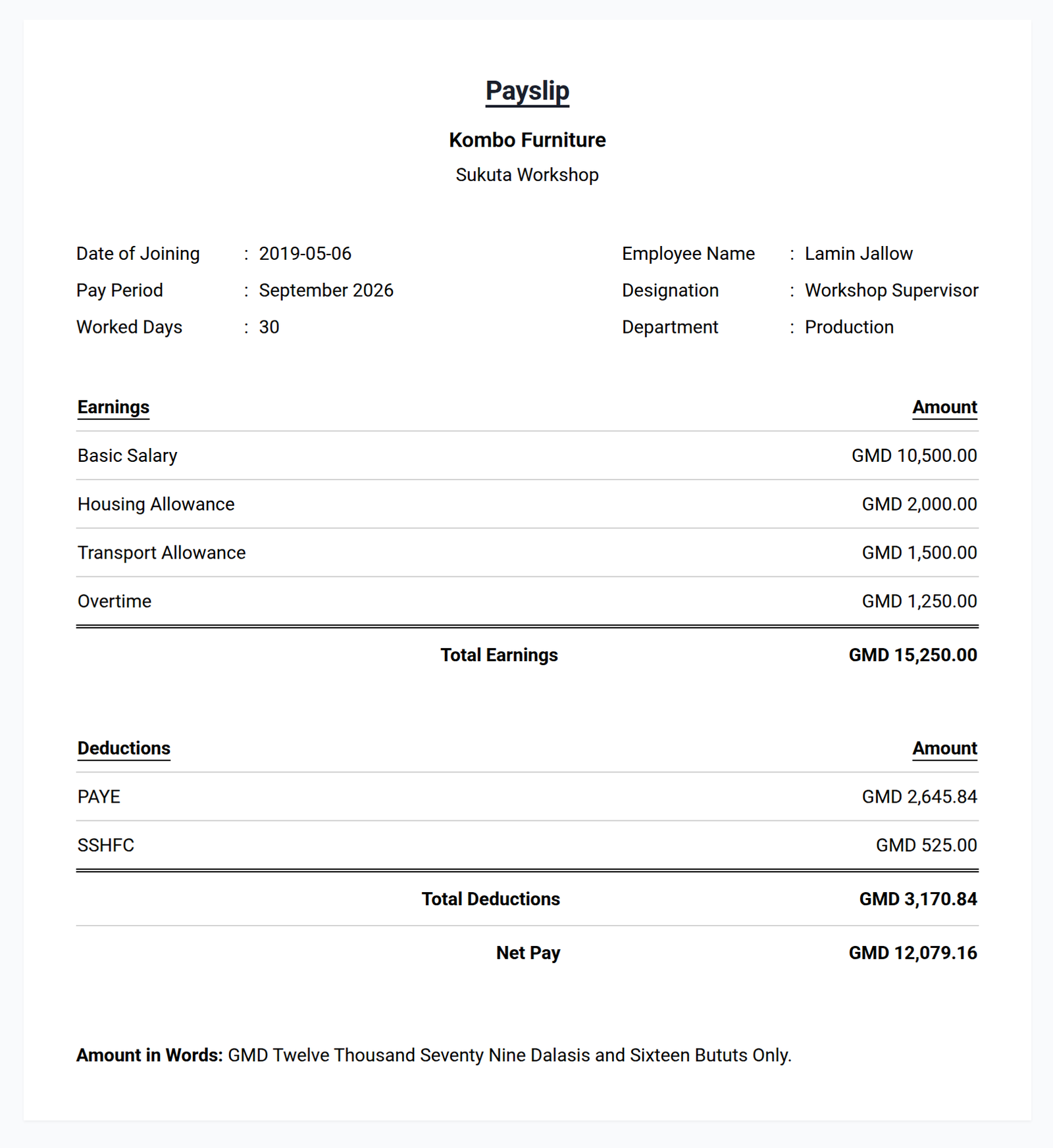
Notice what the payslip does not show: Lamin actually costs the business D16,315.00 this month, his gross pay plus the D1,050 employer contribution and D15 for the injuries fund. That full figure, not the salary, is the number to budget with.
Step 5: Pay your staff, with a payslip
Pay net salaries by bank transfer or however you have agreed, and give every employee a payslip. This is not optional: under the Labour Act 2023, every payment of wages must come with an itemised statement showing gross pay, each deduction and net pay.
A payslip also saves you time. An employee who can see exactly how their pay was worked out does not need to come and ask why it is different this month.
Step 6: Pay GRA and SSHFC by the 15th
The tax and contributions you took from salaries are not yours to keep. For each month's payroll:
- PAYE goes to GRA by the 15th of the following month, with the monthly PAYE schedule listing each employee's pay and tax.
- SSHFC contributions (the employee's 5%, your 10% and the injuries fund) go to SSHFC by the 15th of the following month. SSHFC charges 2.5% of the unpaid amount for each month or part of a month it is late.
So September's payroll is paid over to both by 15 October.
Step 7: Keep your records
Keep a copy of every payslip, every PAYE schedule and every payment receipt from GRA and SSHFC. You will need them if either asks a question, and you will need them the day a former employee asks what they were paid last March.
A monthly payroll checklist
- Before payday: record the month's changes. New starters, leavers, pay rises, unpaid leave, bonuses and advances.
- On payday: work out gross pay, PAYE, SSHFC and net pay, check it, pay staff and hand out payslips.
- By the 15th of next month: pay PAYE to GRA with the schedule, and pay contributions to SSHFC.
How Jokoor Payroll handles each step
Every step above can be done on paper or in a spreadsheet. It is also exactly the kind of monthly routine software is good at. Here is how it runs for Kombo Furniture, our demo business with eight staff across a showroom in Westfield and a workshop in Sukuta. The screenshots are the real product.
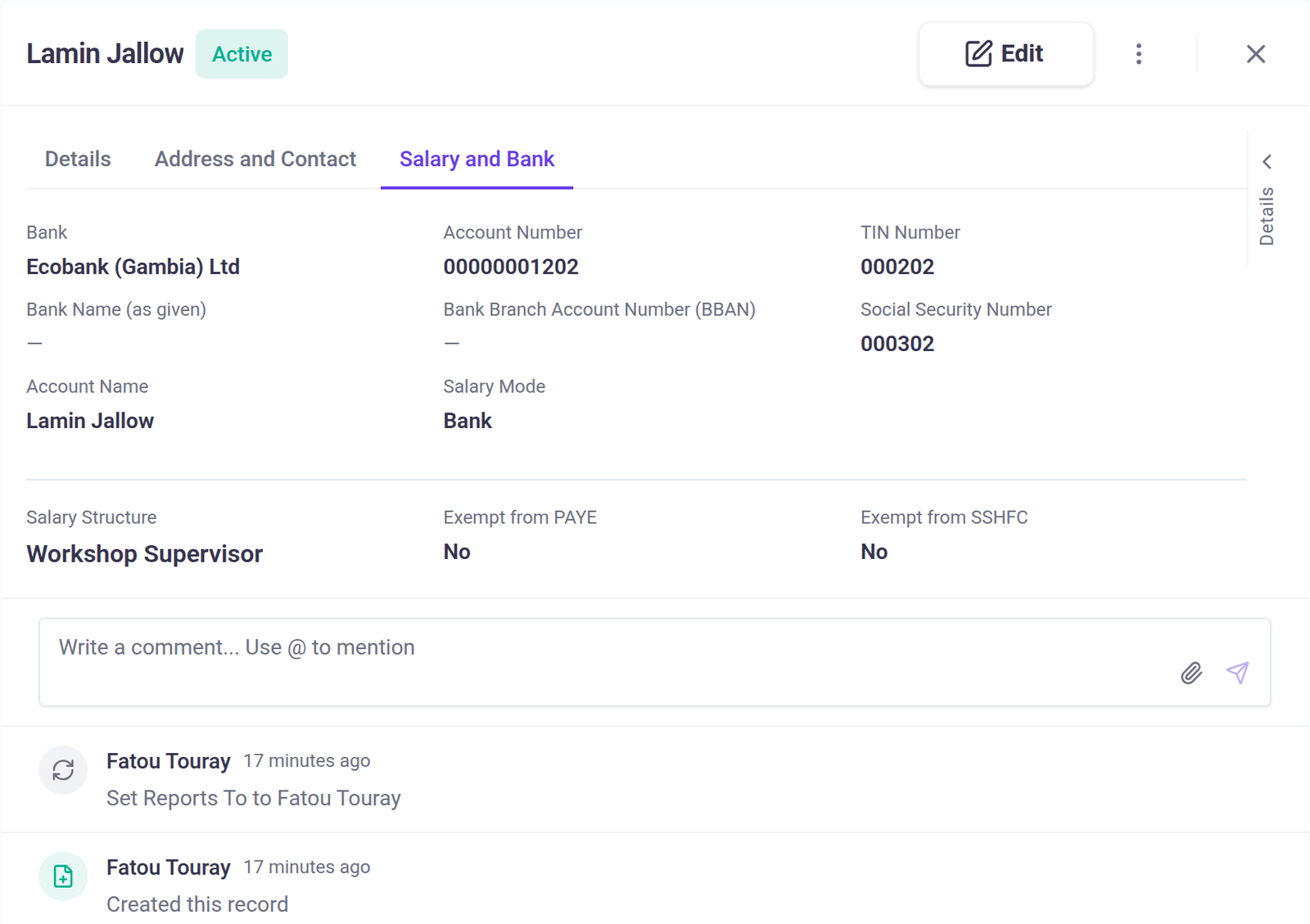
Employee details, once. Each employee's TIN, SSHFC number, bank details and pay structure are entered once, or imported from an Excel sheet. If SSHFC does not cover someone, such as a worker under 18, there is a switch on their record to leave them out.
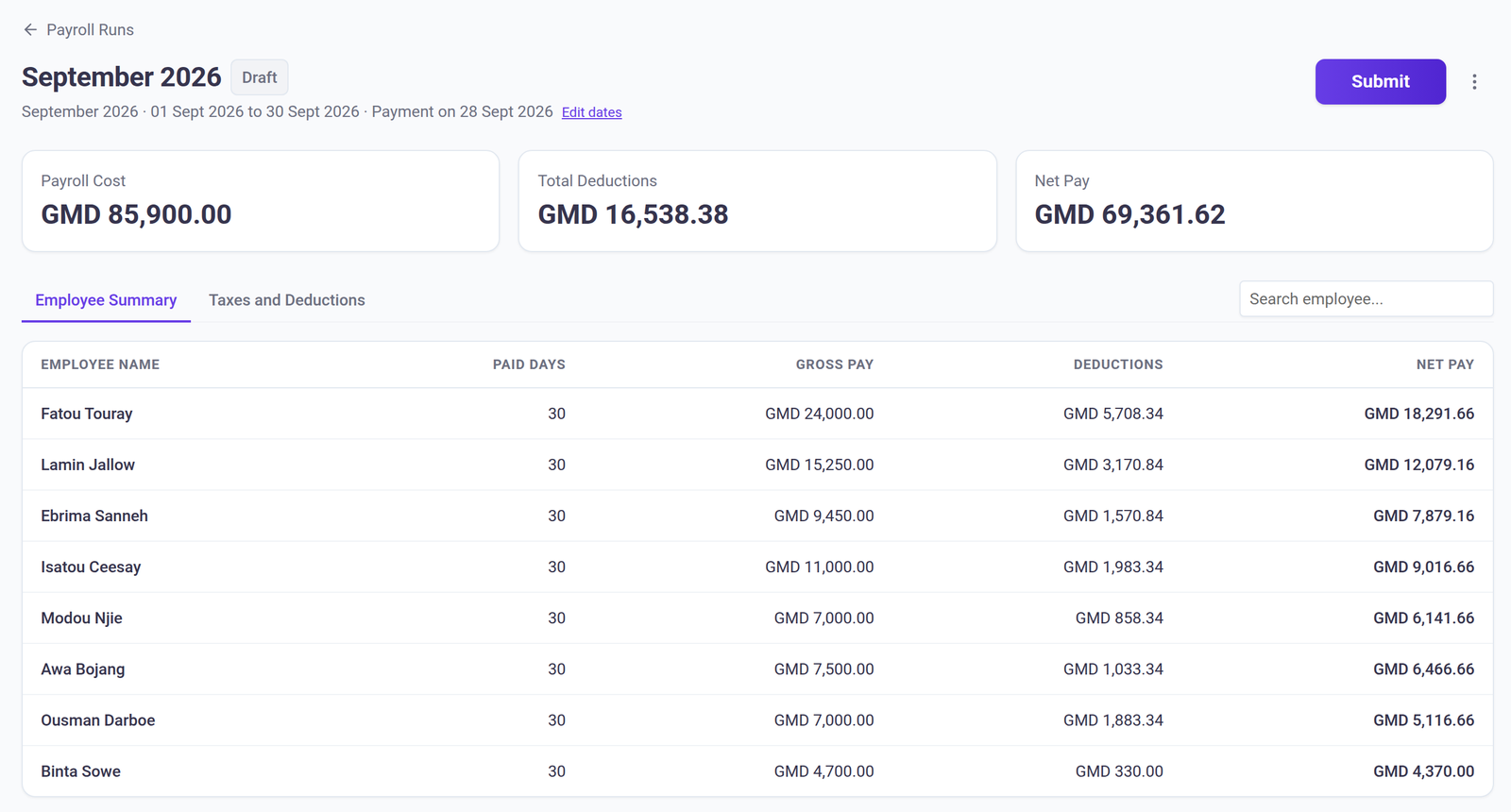
Steps 1 to 4, worked out for you. On the payroll day you choose, Payroll creates the month's pay run with a payslip for every active employee, and PAYE, SSHFC and the injuries fund already calculated on the current bands. You add anything that only applies this month, such as overtime, a bonus or an advance being repaid, straight onto the draft payslip or from an Excel sheet. Approved unpaid leave is taken off automatically. For Kombo Furniture's September, that is GMD 85,900 of gross pay and GMD 69,361.62 to pay out:
Step 5, payslips. When the figures are right, you press Submit. The payslips become final and the run locks. With payslip texts switched on, every employee gets an SMS with a link to their own payslip, and staff can sign in on their phone to see all of their payslips.
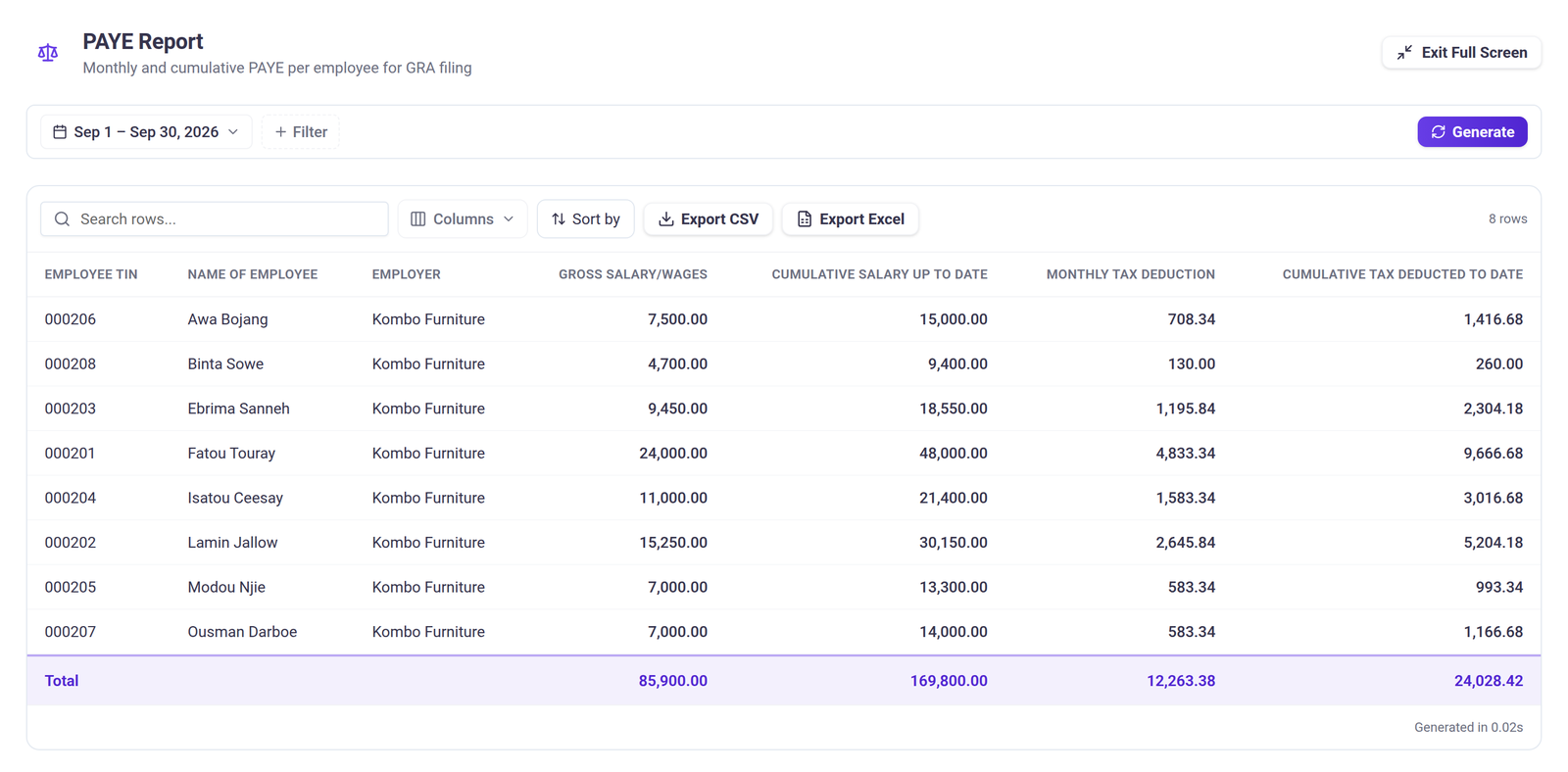
Step 6, the figures for the 15th. Payroll builds the PAYE and SSHFC figures from the same pay run. The PAYE report lists each employee's TIN, pay and tax for the month and for the year so far:
The SSHFC contribution report shows each employee's SSHFC number, basic salary, the employee and employer contributions and the injuries fund:
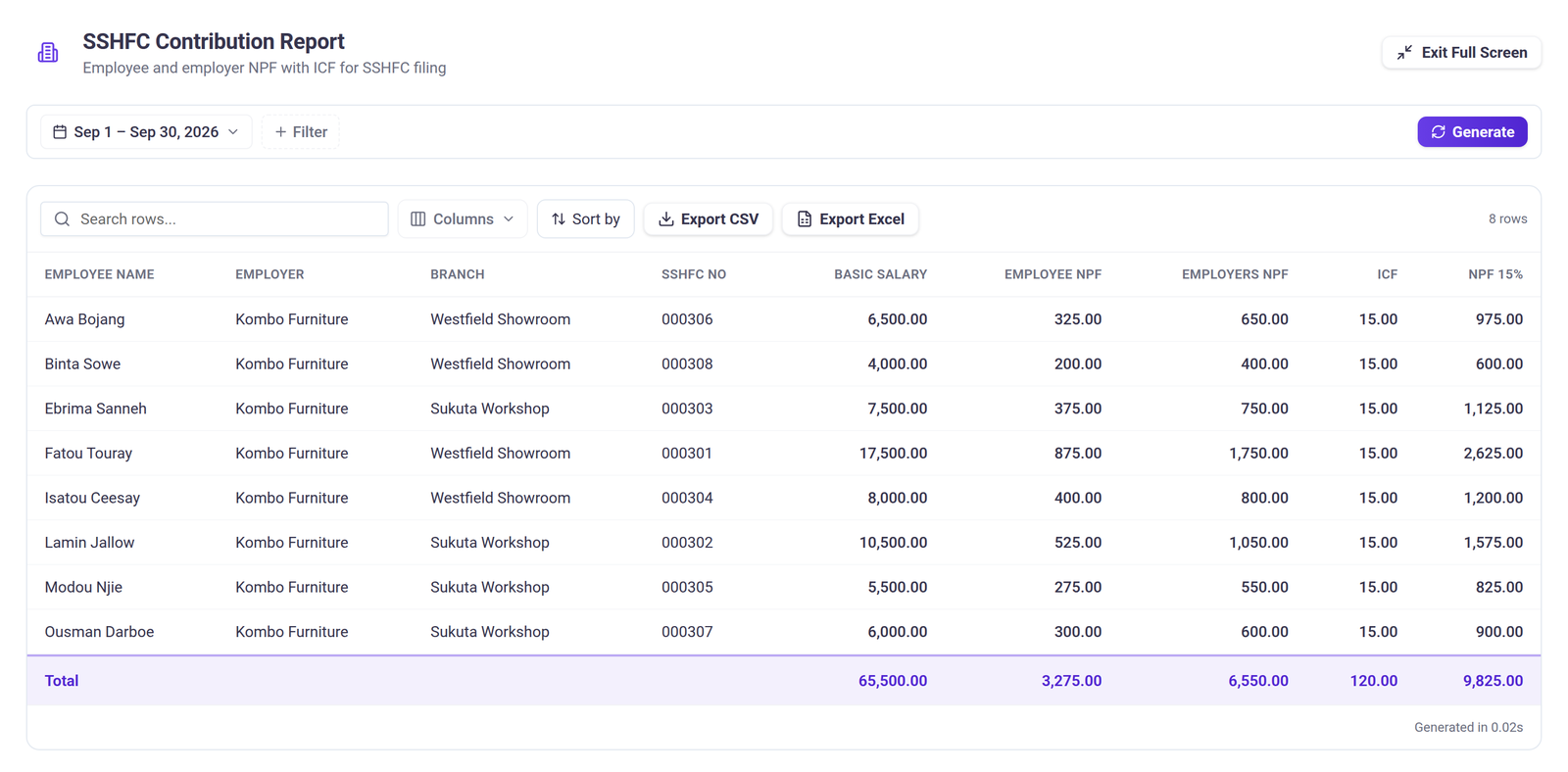
So by 15 October, Kombo Furniture owes GRA GMD 12,263.38 of PAYE and owes SSHFC GMD 9,945.00: GMD 3,275 from staff, GMD 6,550 from the business and GMD 120 for the injuries fund. Both reports export to Excel.
Step 7, the records. Every submitted pay run and payslip stays in Payroll exactly as it was submitted, so last March is always one click away. Payroll also gives you a bank sheet in Excel for the salary transfers, and with the Books connection switched on, one action posts the month's salaries to Jokoor Books.
You can see it at Jokoor Payroll, or call us on +220 2023700 and we will walk you through it. If you are still running payroll on a spreadsheet, read why your payroll spreadsheet is costing you more than you think.
This guide reflects the rules published by GRA and SSHFC as of September 2026. Rates can change with each national budget, so if you are unsure how a rule applies to your business, check with GRA, SSHFC or your accountant.